The page explained everything. Users still had no clue what it was.

A B2B SaaS company builds genuinely useful software for process improvement. Their main lead generator, the product page, describes every feature in detail. Visitors land on it, scroll a bit, and leave. All because people cannot answer two very basic questions after their visit: what is this about, and what do I get when I pay for it?

That was Cierpa Kaizen’s product page.

Cierpa Kaizen is a tool for continuous improvement. Teams log problems directly from the work floor, assign actions, track progress through PDCA cycles, and make sure improvements stick. Their customers are manufacturing companies, operations teams, and organisations that take improvement seriously. The Kaizen product page’s job is pretty straightforward: explain what the software does and get visitors to request a demo.

The page was doing the first part extensively and the second part barely at all. Baseline CTR on the demo button sat at 2.27% (2.14% on desktop, 2.50% on mobile), which translated to roughly one demo request per month. For a B2B SaaS product serving a very niche audience where every single demo is a potential enterprise contract, one per month was not going to grow the business.

This was not a standard CRO project either. The traffic was too low for A/B testing (more on that later), which meant we needed to go deeper on research and find another way to validate.

What the data told us

We started the research phase with scrollmaps, clickmaps, session recordings, a heuristic evaluation, user tests, and surveys. Later on, we deliberately began tracking conversion data in a Google Sheets document because we knew we would need a clean baseline to prove impact later.

Why Sheets? Because Cierpa had set up GA4 themselves with data retention set to two months. With low traffic, that makes it nearly impossible to find reliable trends. We spotted this early, built funnels in GA4, and copied the data into Sheets so it would actually be there when we needed it. Otherwise it would not only be thin, but gone. The formal baseline measurement period ran for 9 weeks prior to implementation of the changes.

Users were leaving before seeing anything useful

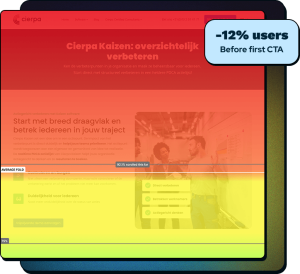
The scrollmap painted a pretty brutal picture. 12% of visitors left before even reaching the first CTA, which sat below the fold.

By the time users reached the USP section, 43% were already gone. That means the majority of visitors never saw the pricing, the testimonials, the FAQ, or the contact form. They left somewhere in the first two sections.

The product wasn’t visible

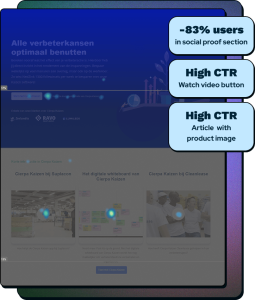
We found a disproportionately high click rate on a YouTube demo link buried very deep down on the page, in a section where 83% of visitors had already left.

The small group that actually reached it clicked at an unusually high rate. We saw the same pattern on a blog article further down whose thumbnail showed a screenshot of the software.

We took this as a signal that users who survived long enough to find product visuals were desperate to see what they were paying for.

Users were lost on the page

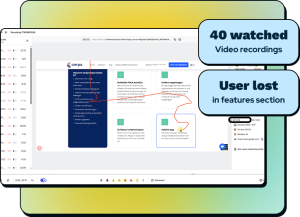
Session recordings revealed a repeating pattern in the “Cierpa Kaizen at a glance” section. Users scrolled up and down, then up again, then down.

They looked like they were trying to read a book where someone had shuffled all the chapters. The section contained ten text blocks with no clear order, several of which said essentially the same thing with minor variations. Users mostly stuck to the top two sections on the page and gave up.

The content described features, not outcomes

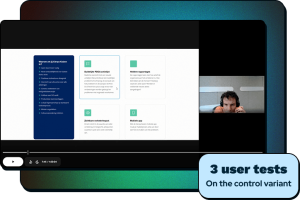
We ran user tests with participants who had no prior exposure to Cierpa. The feedback was consistent: the page had a lot of text, a lot of jargon, and after reading all of it, users still could not answer two basic questions. What is Cierpa Kaizen? And what do I actually get when I pay for it?

There was plenty about what Kaizen does. There was almost nothing about what it does for you. And that distinction matters more than most companies realize.

Surveys confirmed the same themes but did not reveal much new. Low response rates are quite typical for B2B, where the buyer may not be the end user, or they are simply too busy for your questions.

A heuristic evaluation mapped every issue

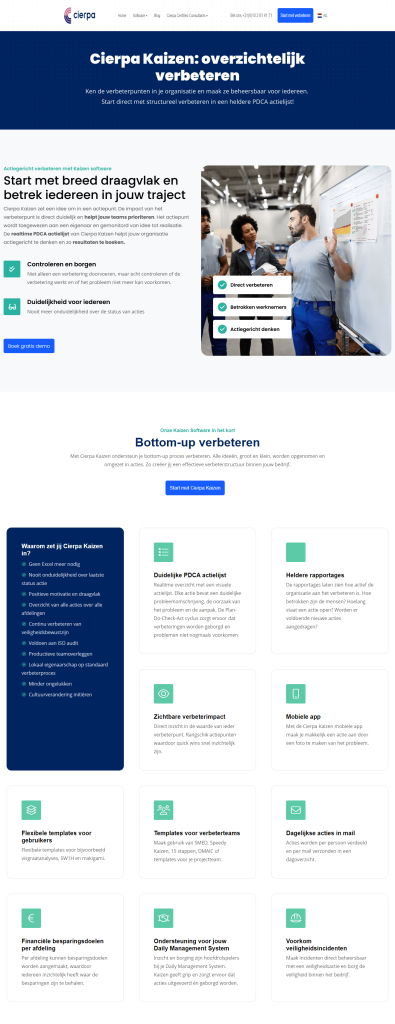
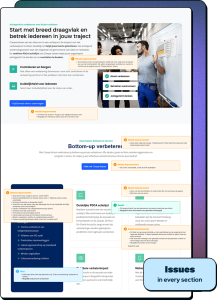
We annotated the entire control page section by section. The findings ranged from copy that made the software sound like a spreadsheet (“Get started right away with structural improvements in a clear PDCA action list!” could just be Excel), to USPs that just restated each other, to red crosses in the pricing table creating a negative association, to form labels that disappeared when users started typing, to a submit button that said “Send!” without telling users they were actually requesting a demo.

Every section had issues. Some small, some more structural.

A/B testing was off the table

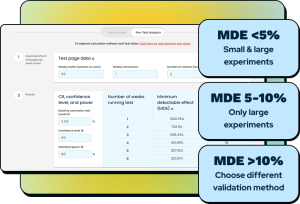
We ran an MDE (Minimum Detectable Effect) calculation and the conclusion was straightforward: with the traffic this page receives, we would never reach statistical significance in a reasonable timeframe. We presented this to the owner of Cierpa as a reason to use a different validation method: preference testing through Lyssna with qualitative user feedback and a causal effect analysis.

What we changed and why

We redesigned the entire page. Every section was thoroughly examined and improved. The decisions below are ordered as they appear on the page, and trace back to something we found in the research.

Hero section: two sections became one

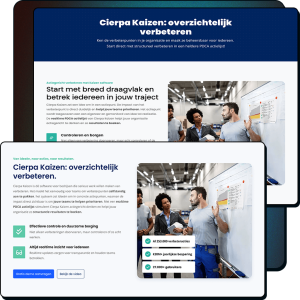
The control had a hero banner at the top, then a separate intro section below it with body text, USPs, and the first CTA. The problem: the CTA sat below the fold. Scrollmap data showed 12% of users left before ever reaching it. Clickmap data showed the most engagement was concentrated on the top CTA area and, oddly, on a video link much further down the page.

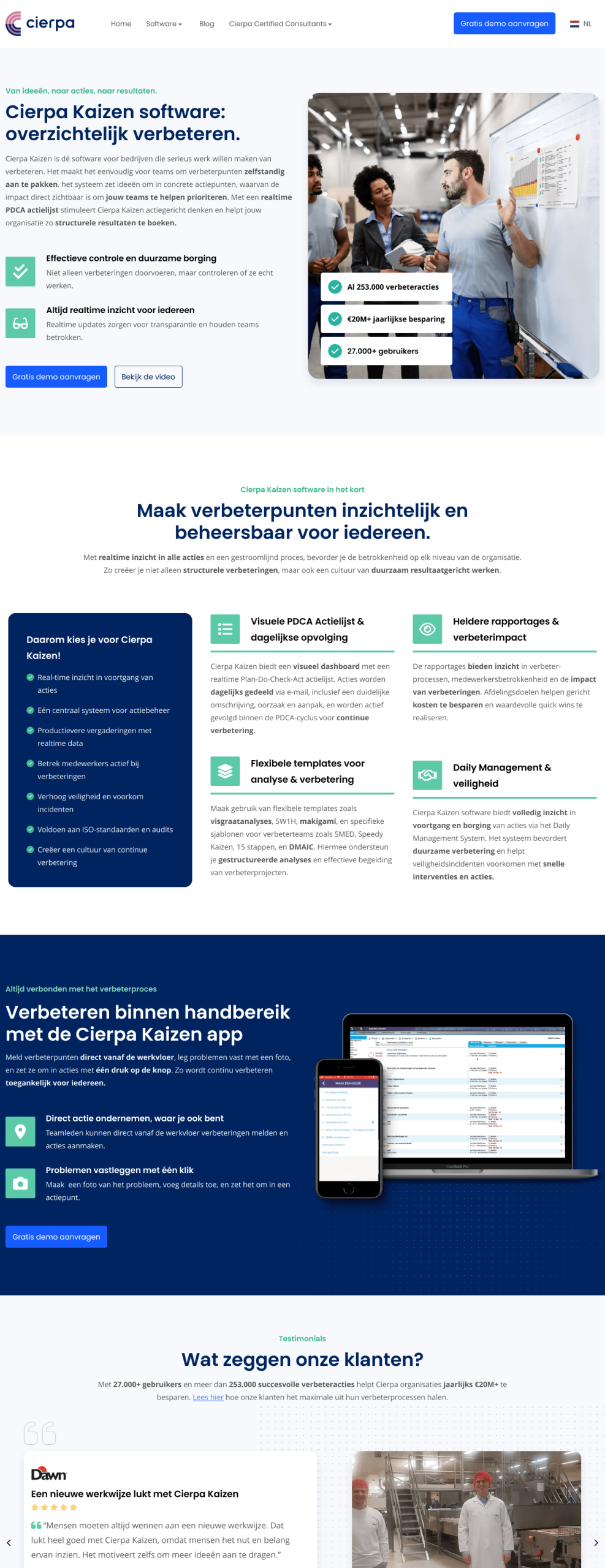
We merged both sections into one. The title stayed (“Cierpa Kaizen: Improving with clarity”) but the subheader changed, and the body text was completely rewritten to lead with outcomes rather than features. The copy was rewritten around autonomy, visible impact, and lasting results.

The CTA changed from “Request a demo without obligation” to “Request a free demo,” putting the word “free” right there to lower the barrier. We added a secondary CTA, “Watch the video,” because the clickmap data proved users were actively seeking product visuals. That video link had been buried where 83% of users never reached it. We pulled it up to where everyone could see it.

Social proof numbers, that prove this is a product used at scale, were added to the hero image instead of vague claims about involved employees and action-oriented thinking: 27,000+ users, 253,000 improvement actions, 20M+ annual savings.

USP section: from ten blocks to four

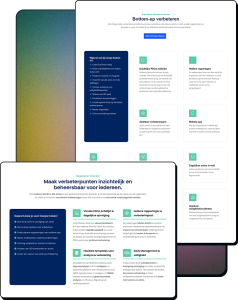
The “Cierpa Kaizen at a glance” section was the biggest structural problem on the page. Ten text blocks, many overlapping, no clear reading order, and recordings showing users literally scrolling up and down unable to figure out where to start.

We merged them strategically. The PDCA action list and the daily email actions became one block (both are about tracking and following up on actions). Reporting and financial savings goals became one block (both are about measuring impact). The two template sections became one block (same concept, different examples). Daily Management and safety incidents became one block (both are about process assurance and prevention).

The “Why choose Cierpa Kaizen” sidebar got cleaned up too. Items like “No Excel needed anymore!” (is that really a USP in 2025?) and overlapping bullets about status visibility were removed or sharpened.

The mobile app, which had been a single tiny mention among the ten blocks, was pulled out entirely to become its own section on the page. More on that in a moment.

We also removed the CTA from this section. It sat too close to the hero CTA and stacking two demo buttons that close together just looks pushy. The CTA was moved to the new mobile section instead.

The section title changed from “Improving from the bottom-up” to “Make improvement opportunities visible and manageable for everyone.” The original title “From ideas, to actions, to results.” was moved up to the hero as the eyebrow text, because it describes the entire product journey in six words. That move, by the way, was directly suggested by a participant in the first Lyssna test.

Mobile app section: entirely new

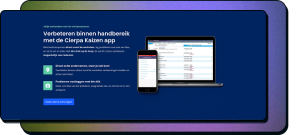
This section did not exist in the control. It was born from two things: the research showing users wanted to see the product, and a conversation with the owner of Cierpa that revealed the mobile app as one of their most defining features.

The insight was simple. We told the owner: “You don’t buy a car when you haven’t seen it.” Users probably were not obsessing over exact interface details, but they needed confirmation that this is real software, not just a concept described in text.

That conversation also surfaced a compelling use case. Without the mobile app, reporting a problem on the work floor looked like this: see the problem, try to remember it, walk to a location with a PC, log it, realise you forgot to take a photo, walk back to the scene, take the photo, walk back to the PC, figure out how to upload it, upload it, and finally create the ticket. Ten steps. With the app: see the problem, take out your phone, report it, snap a photo in-app, ticket created. Five steps.

That is not just a feature description. That is a time and accuracy argument. Problems actually get reported instead of being forgotten because someone was too busy to walk to a PC.

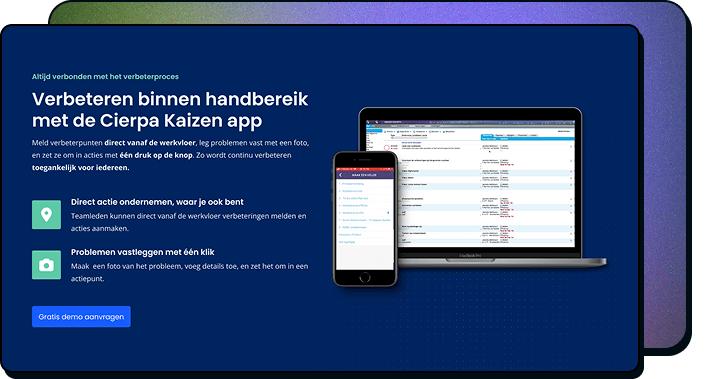
The section includes a clear title (“Improvement at your fingertips with the Cierpa Kaizen app”), body text focused on direct-from-the-floor reporting, two USPs with icons, and the “Gratis demo aanvragen” CTA.

The product image initially showed only a phone mockup. In the first Lyssna test, participants thought Cierpa Kaizen was a mobile-only app. We fixed this by adding a desktop device next to the phone, making it clear this is a full system that also works on mobile. Small change, big difference in perception.

Test participant quote:
“Visually, this version is also more attractive, with more variety in blocks, good dynamics and a beautifully designed laptop and smartphone block!”

Testimonials: quantified social proof

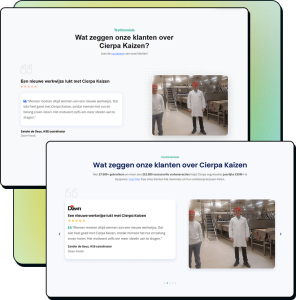
The control had reviews in a carousel with dot navigation that nobody realised was navigable. Hotjar data showed users were interested in the testimonials but could not figure out how to move between them.

We added hard numbers to the section header: 27,000+ users, 253,000 improvement actions, 20M+ in annual savings. Client logos went directly onto the review cards for authority. The quotation marks changed from blue to green because blue was being reserved exclusively for CTAs across the entire page (consistency matters, even in the small things). Navigation dots were accompanied by visible arrows on the sides. The “read success stories” link was changed to open in a new tab instead of pulling users off the page entirely. And the H3 header size was standardised to 20px for consistency with the rest of the page.

Pricing: from cost framing to value framing

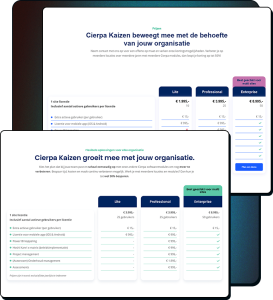
The section eyebrow said “Prices.” We changed it to “Flexible solutions for every organization.” Seeing the word “prices” at the top of a section can trigger a defensive reaction, especially in B2B where purchasing decisions involve multiple stakeholders. Framing it as “flexible solutions” shifts the conversation from cost to fit.

The title changed from “moves with” to “grows with,” which is more active and implies a partnership that scales rather than software that passively follows.

The body text was rewritten to lead with action (“Choose the plan”) and explicitly mention the scalability across Cierpa’s other software modules and the 50% discount for multiple locations.

Visual fixes: blue line accents changed to green (blue reserved for CTAs). Red crosses for features not included in a package were replaced with dashes, because red crosses created a negative visual association with the product. The purple “Most applicable to enterprises” label changed to green, fixing both a brand inconsistency (purple appeared nowhere else on the site) and a WCAG contrast issue. The three identical CTAs at the bottom of the pricing columns were removed since they all led to the same page anyway. And the feature description column was narrowed so the package columns got more breathing room.

Social proof: stripped to its purpose

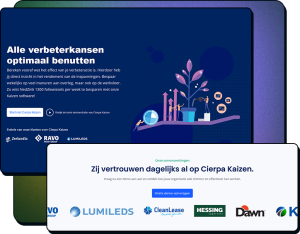
The control version of this section was trying to do too much. It had a text block about “alle verbeterkansen optimaal benutten,” a video link that pulled users off the site, a CTA, and a small logo bar with three logos under a subtitle that implied you could click on them. You could not.

We stripped it down to its real job: social proof. Clean eyebrow (“Our partnerships”), a trust-focused title (“They already rely on Cierpa Kaizen”), a short body line with CTA, and a proper logo carousel featuring significantly more client logos which now link to their respective success stories.

The redundant copy, the off-site video link (already moved to the hero), and the misleading non-clickable logos are gone. What remains does one job well.

Articles: proper framing and reusable components

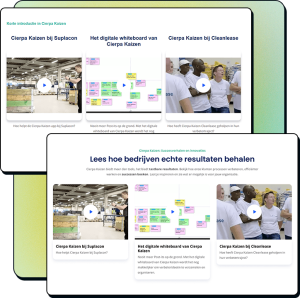
The control had no title, no body text, and cards that felt disconnected (title above the video, text below, not reading as one cohesive unit). The subtitle was left-aligned while the rest of the page was centred. The CTA said “Start with Cierpa Kaizen” but actually led to a demo request form. That is a trust issue waiting to happen.

We added a proper eyebrow (“Cierpa Kaizen software: Success stories and innovations”), a results-focused title (“See how companies achieve real results”), and body text that frames the articles as proof that the benefits described higher on the page are real. The cards were redesigned to share the same component as the blog section, which saves development time and maintenance effort. The CTA was corrected to “Request free demo.”

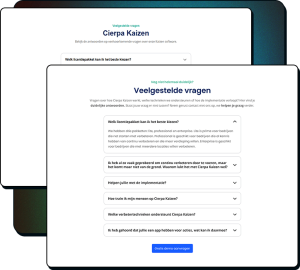
FAQ: better introduction.

The FAQ section was already functional (it was one of the few things we marked as “Good” in the heuristic evaluation), but the introduction needed work. “Cierpa Kaizen” as the main title told users nothing about what this section is. We swapped the eyebrow and title so “Frequently asked questions about our Kaizen software” became the heading (immediately clear) and “Still not completely clear?” became the eyebrow, which lowers the threshold and signals that having questions is perfectly normal.

The body text was rewritten to be more inviting and includes a fallback (“Don’t see your question? Contact us, we’re happy to help.”).

A minor UX fix: the accordion chevron arrows now flip upward when a section is open, giving users clear visual feedback that the section can be collapsed. In the control, the arrow stayed in the same position regardless of state. Small thing? Yes. But users should never have to guess whether something is interactive.

The FAQ content itself was expanded by a SEO specialist who worked on the Kaizen page in parallel, adding questions about the Kaizen methodology, its origins, supported techniques, implementation, and training.

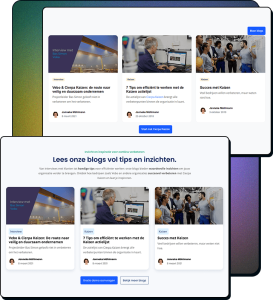
Blogs: consistent design and correct semantics

The blog section got an eyebrow (“Insight & inspiration for continuous improvement”), a title (“Read our blogs packed with tips and insights”), and body text mentioning specific companies like Vebo for social proof. The cards share the same reusable component as the articles section, with category labels and author info added for blogs (and stripped for articles).

One detail worth mentioning: the category labels in the control were yellow, which in Cierpa’s design system indicates “warning-light.” Using a warning colour for blog categories is semantically wrong. We changed them to blue (“info-light”), the correct usage. Design systems exist for a reason, and using them correctly is part of the job.

The “More blog posts” button moved from an illogical position in the top right corner (it also competed in colour with the primary action) to sit next to the demo CTA as a ghost button. Two clear options: request a demo, or browse more content. The flow stays intact.

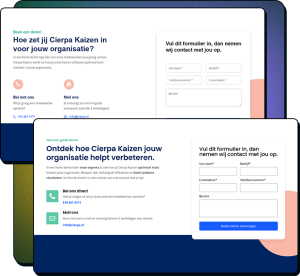
Contact form: from generic to outcome-focused

The control form section had an open-ended question as its title (“How will you use Cierpa Kaizen for your organization?”) that our heuristic evaluation flagged as not guiding users toward the desired action. The body text mentioned “one of our employees” would handle the demo, which sounds like a random employee, not a specialist. And the form labels sat inside the input fields, meaning they vanished the moment someone started typing.

We changed the eyebrow to “Schedule a free demo” (calmer, emphasises free). The title became “Discover how Cierpa Kaizen helps your organization improve” (action-oriented, frames the demo as beneficial). The body text now mentions “our experts” and focuses on outcomes: save time, increase efficiency, achieve tangible results. The form labels are persistent above the fields so they are always visible, even after autocomplete fills in data.

Reusable components across the page

We recommended a component-based approach to reduce both development time and long-term maintenance. Three sections share the same base component: the hero, the mobile app section, and the contact form (with a form replacing the image). The article and blog sections share a single card component, with labels and author info toggled on or off depending on context.

This means that if Cierpa wants to update the card design in the future, they change it once and it updates everywhere. And the same layout patterns can be extended to other pages on the site.

Validating without A/B testing

We couldn’t run an A/B test because of a high MDE, so we had to validate through other methods.

Test participant quote:
“I find this option more appealing. But it took me relatively long to figure out what this product is about. You clearly did not pass the elevator pitch test.”

First test: a signal, not a verdict

We ran a preference test through Lyssna with 40 participants, showing the control and variant side by side for the top four sections of the page. The question: “Which design gives you a clearer picture of the software being offered?”

The result was 53% in favour of the redesign, 47% for the control. Not statistically significant. But the qualitative feedback was where the real value sat.

One participant on the variant side said: “I find this option more appealing. But it took me relatively long to figure out what this product is about. You clearly did not pass the elevator pitch test.” That is the kind of feedback that tells you the direction is right but the execution needs sharpening.

On the control side, someone asked: “Is it a PM tool, team management software, sprint planner, Jira competitor?” Another wrote: “No one will read all 10 bullet points and cards.” These were not just an opinion but confirmation of the same problems the research had already surfaced.

What we changed based on feedback

Three specific changes came directly from participant comments.

First, a participant suggested the title “From ideas, to actions, to results” was stronger than “Improving with clarity.” We agreed and moved it to the hero eyebrow, where it describes the entire product journey in six words.

Second, multiple participants said they could not tell Cierpa Kaizen was a software product. So we opened the body copy with “Cierpa Kaizen is the go-to software for companies that are serious about continuous improvement.”

Third, repeated feedback about too much text led us to shorten the feature descriptions under the icons.

We also fixed the mobile app section image. The first version showed only a phone, and participants assumed Cierpa Kaizen was a mobile-only app. Adding a desktop device next to the phone clarified that this is a full system.

Second test: significance reached

After incorporating the feedback, we ran a second Lyssna preference test. This time we tested the entire page, not just the top four sections.

The redesign reached statistical significance. The additional feedback was almost entirely empty. Respondents had nothing left to suggest.

Developer hand-off

Dev hand-off document

We delivered two things: a detailed text document covering every section with Figma design file links, dev mode links, all copy specified with exact heading hierarchy, FontAwesome icon references, Google Drive links for design assets, and the full expanded FAQ content. Alongside this, a visual guide in Figma with anatomy breakdowns and spacing specifications for every section across desktop, tablet, and mobile breakpoints.

Follow-up after implementation

The goal was zero ambiguity. The developer should not have to guess at spacing, hunt for copy, or figure out which icon variant to use. We discussed the dev hand-off during a Google meet call and they started building

After implementation, we tested the live site and found minor issues: inconsistent left and right spacing on mobile, margins set to 20px where 10px would save valuable screen space, and a missing secondary video CTA in the hero. All fixed in the first round. No structural problems.

Results

Monitored from 20 May to 29 September 2025.

Demo requests went from approximately 1 per month to 4 per month. For a B2B SaaS product with a niche audience where every demo is a potential enterprise contract, that is the difference between a page that exists and a page that works.

SectionBeforeAfterRelative Change
Hero92.1%100%+8.6%
USP55.9%59,1%+5.7%
Bottom of USPs43%52.1%+21.2%
Reviews33%33.5%+1.5%
Pricing25%27%+8%
Social Proof17%19.1%+12.4%
Articles13%14.4%+10.8%
Bottom of FAQ10%12.1%+21%
Contact Form8%9.3%+16.3%

Scroll depth improved across every section:

The biggest scroll depth gains landed exactly where we made the biggest changes. The +21.2% relative improvement at the bottom of the USPs directly correlates with reducing cognitive load from ten blocks to four. Users were no longer getting lost and leaving. They were making it through.

The improvements cascaded down the page. More users surviving the top sections meant more users reaching everything below them. The bottom of FAQ showed a +21.0% relative increase despite only minor changes to that section itself.

Silence is the biggest win

After the redesign, clicks on the YouTube demo link and the product-screenshot blog article dropped to near zero.

In the control, users who stayed after 83% already left were clicking desperately on anything that showed the actual product. That behaviour was a signal, and we designed for it. The mobile app section with phone and desktop mockup, the video CTA in the hero, the clearer product communication throughout, all of it was built to answer the question users were asking with their clicks: “What am I actually buying?”

The demand for product visuals was satisfied on the page itself.

What this project teaches

Other validation methods

When A/B testing is not possible, that does not mean you cannot validate. It means you need to be smarter about how. Deeper research, preference testing, qualitative feedback, and a causal effect analysis gave us validation without needing the traffic volumes that traditional A/B testing demands.

What value does this bring to the user

Showing off all features do not automatically make a product valuable for users. The original page wasn’t lacking information:
Ten text blocks, extensive feature descriptions, plenty of words. But none of it answered the question that actually matters to a buyer: “What does this do for me?” Shifting from features to outcomes ran through every section of the redesign, from the hero copy to the pricing framing to the contact form.

Users want to see what they get

Show the product. We found users hunting for visuals of the software at the bottom of a page where almost nobody reached. They wanted to see what they were buying, and the page made them work for it. We brought that to the surface and the hunting behaviour disappeared. You do not buy a car when you have not seen it.

A consistent user experience

Consistency compounds. Reserving blue for CTAs only. Replacing red crosses with neutral dashes. Using the correct semantic colours from the design system. Fixing accordion arrows. Persistent form labels. Standardised header sizes. Reusable components. None of these are headline-worthy on their own, but together they make a difference.

Performance report and scalability

We delivered a performance report to the owner of Cierpa and recommended extending the reusable component approach to other pages on the site, so the improvements in clarity and consistency could scale beyond the Kaizen page.

What others say about me.

I can try to convince you of my skills, but I’d rather let others tell you!

Let’s Create Something Together!

Whether you’re looking for a data-driven UX designer for your team, or just exploring new ideas, I’d love to hear from you. I always welcome meaningful conversations, portfolio feedback, or opportunities to solve real user problems together. Let’s connect and see where it leads.

Name
Email
Message
Request sent successfully
There has been an error while submitting the form. Please verify your input.
Scroll naar boven